
CardioSignal: Smartphone heart rate monitoring following ablation
CardioSignal can help you detect whether you are experiencing atrial fibrillation again after your ablation. You can use CardioSignal with your mobile phone. As atrial fibrillation can occur without any symptoms, it is a good idea to monitor your heart rhythm regularly.
What to do if your app detects palpitations (atrial fibrillation):
- If the symptoms are the same as before your ablation procedure, you can wait and see if the episode stops.
- If your symptoms are different from usual, we recommend that you contact your GP to arrange an ECG. If necessary, the ECG can be sent to Privathospitalet Mølholm for assessment.
- If the episode is unbearable, you should contact your GP or the out-of-hours service to arrange admission to your local hospital for a ‘shock’ (DC Cardioversion).
- If you experience a recurrence of atrial fibrillation that does not significantly affect you, you can wait a couple of days and see how it progresses. If the atrial fibrillation does not stop on its own within two days, you should contact your doctor to arrange admission to your local hospital for a ‘shock’ (DC Cardioversion). You are always welcome to contact Privathospitalet Mølholm if you have any concerns.
- If you experience frequent relapses following treatment, you may require stronger heart medication to stabilise your heart rhythm. We will usually recommend taking Cordarone for three months. This is well tolerated by most patients without significant side effects.
NB! In the event of severe chest pain, severe shortness of breath or fainting, you are advised to seek urgent medical attention or call emergency services on 112.
Q&A about the CardioSignal app
CardioSignal is an app for mobile phones that can be used to monitor your heart rate and alert you if atrial fibrillation is suspected.
How to get CardioSignal:
- Open the App Store on your iPhone or Google Play on Android
- Search for "CardioSignal" and click download
NB! Some older models of smartphones cannot support the app's features.
- Lie on your back and relax
- Press "Start" to begin the measurement
- Place your mobile phone on your sternum with the screen facing upwards, without holding it
- Lie still and do not speak for one minute
- View the measurement result on the screen
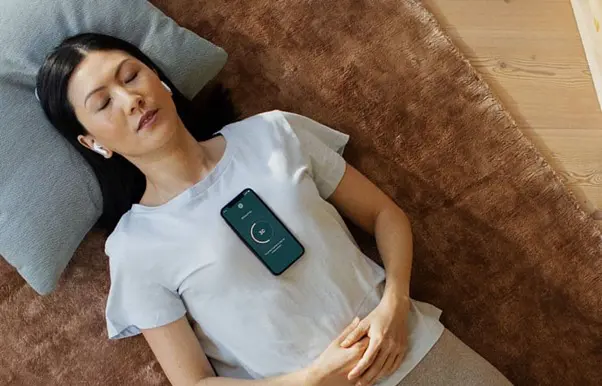
We recommend taking a measurement once a week. For example, every Sunday morning.
The CardioSignal app uses a motion sensor built into all modern smartphones – iPhone or Android. Because the heart moves with every heartbeat, the app can detect whether the heart rhythm is normal or if there is a suspicion of atrial fibrillation.
Yes, the method of measuring your heart rate using CardioSignal and a mobile phone has been thoroughly tested in clinical studies.
Scientific studies show that atrial fibrillation is detected with 95% certainty. There is only a 4% risk of a false positive result for atrial fibrillation. Taken together, this means that CardioSignal's assessment is 96% accurate.
CardioSignal is compatible with both iOS (iPhone) and Android. However, some older mobile phones do not have the necessary built-in motion sensor. If this applies to your smartphone, you will not be able to download the app.
Please check your spam filter. If this doesn't solve the problem, please email support@cardiosignal.com for assistance.
Try reading the measurement instructions carefully again. Make sure you lie still during the measurement and do not hold your mobile phone in your hand. If the problem persists, you can contact the CardioSignal's support team at the following email address: support@cardiosignal.com
Yes, if your case is thin. We recommend removing the phone from thick cases or if you are using a flip case.
- Try taking the measurement with the phone lying directly on your skin. Or with a top or shirt that isn’t smooth.
- Make sure your chest is horizontal. Either because you’re lying down or sitting very reclined in a sofa or chair.
- Try turning your phone off and on again
- Make sure you’re connected to a Wi-Fi network
- Make sure your CardioSignal app is up to date. The easiest way is to open the App Store (iPhone) or Google Play (Android), search for "CardioSignal" and check if an update is recommended.
Specialists and practitioners